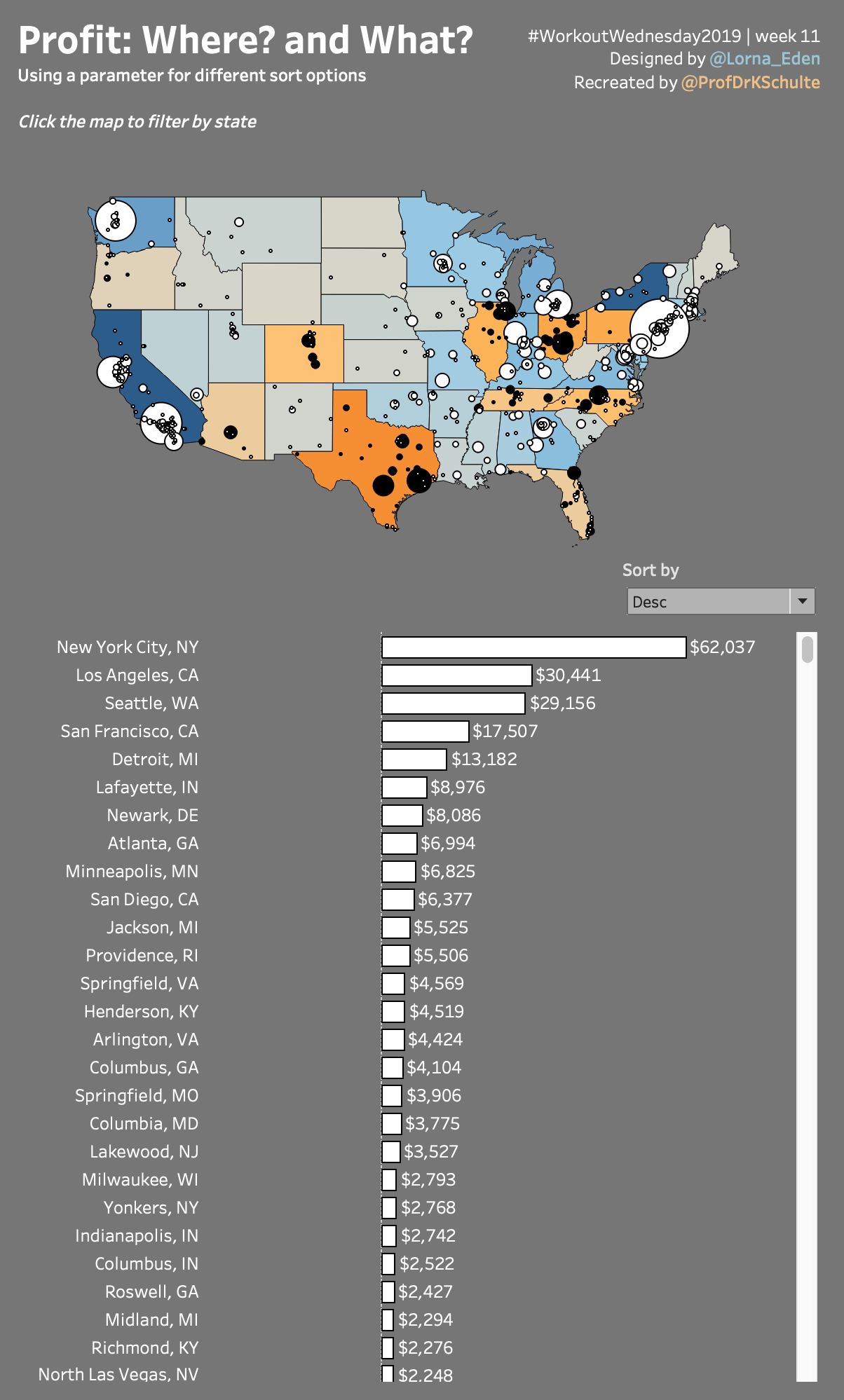
This week I had a lot of fun recreating Lorna Eden's #WorkoutWednesday2019 challenge. One key element was to implement a custom sort control (click to play with the interactive version on Tableau Public):
We should use a parameter to allow a sort by (city) A-Z, (city) Z-A, (profit) asc, and (profit) desc.
I really loved to see how everyone found her or his way to implement this.
Create a Sort Parameter
First thing you need isto create is a sort parameter. I created this one:
I chose an integer parameter mainly because it is easier to reference in the calculated field you have to create in the next step.
Create a calculated field
Basically, there are two ways to do it:
Create a sort-field without table calculations, that can be selected in the dimension field under 'sort by -> field' (you cannot use table calculation as a 'sort by'-field).
You can do this by using the ASCII-formula. ASCII Returns the ASCII code for the first character of a string, for example 65 for A and 66 for B. For the A-Z and Z-A order you can then sort on avg(ASCII_code) for ascending and -avg(ASCII_code) for descending. For sorting by profit you can sort on sum(profit) for descending and -sum(profit) for ascending.
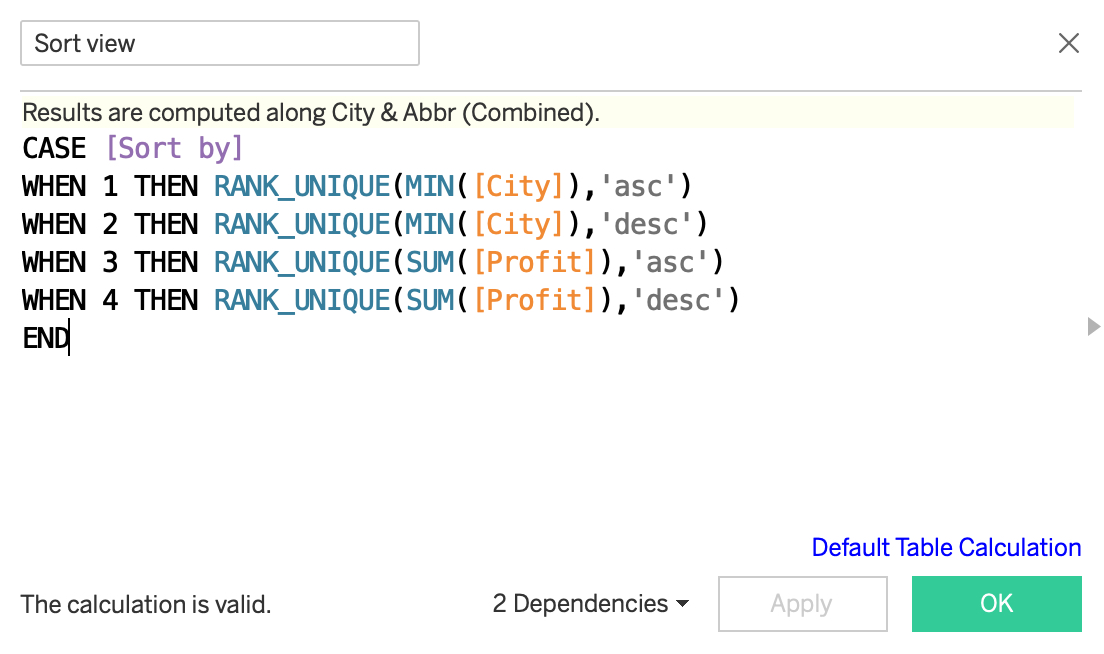
Create a calculation that includes table calculations, make it discrete and use it as a hidden dimension in the view (that's how I did it).
Here's my calculated field:
I love how you can use one identical formula for both sorting on numbers and strings. And I love how the rank formula allows you to define the sort order explicitly, instead of using a negative sign like shown in the first approach.
Implement the sort field in the view
Last step is to implemented it in the view:
Make sure to calculate the ranks on the right level of detail. In my case, I used a combined field of city and abbreviation, that's why I had to compute my ranks using these dimensions.
For the final view I hid the sort view header and was ready to go.
Nice! 😊
There are many use cases for sort controls like this, allowing users to play with the sorting!
Hope you find own use cases for this and enjoyed reading.
![Edit Parameter [Sort by] 2019-03-15 15-38-49.jpg](../images/wp-content__uploads__2019__03__Edit-Parameter-Sort-by-2019-03-15-15-38-49.jpg)
![Tableau - Profit- Where? and What? WoW 2019:11 [from PUBLIC.TABLEAU.COM (DEFAULT)] 2019-03-14 22-12-30](../images/wp-content__uploads__2019__03__Tableau-Profit-Where-and-What-WoW-201911-from-PUBLIC.TABLEAU.COM-DEFAULT-2019-03-14-22-12-30.jpg)
![Tableau - Profit- Where? and What? WoW 2019:11 [from PUBLIC.TABLEAU.COM (DEFAULT)] 2019-03-15 15-51-45](../images/wp-content__uploads__2019__03__Tableau-Profit-Where-and-What-WoW-201911-from-PUBLIC.TABLEAU.COM-DEFAULT-2019-03-15-15-51-45.jpg)
![Tableau - Profit- Where? and What? WoW 2019:11 [from PUBLIC.TABLEAU.COM (DEFAULT)] 2019-03-14 22-17-00.jpg](../images/wp-content__uploads__2019__03__Tableau-Profit-Where-and-What-WoW-201911-from-PUBLIC.TABLEAU.COM-DEFAULT-2019-03-14-22-17-00.jpg)